Blacklist and Whitelist
Blacklist is a special type of rule that moves messages into Junk/Spam folder based on the sender's email or domain.
The Local Blacklist is used when you use the 'Move to Junk and blacklist email /domain' feature.
Whitelist is a list on the server that will prevent a message from specific senders ever being put in Junk/Spam folder.
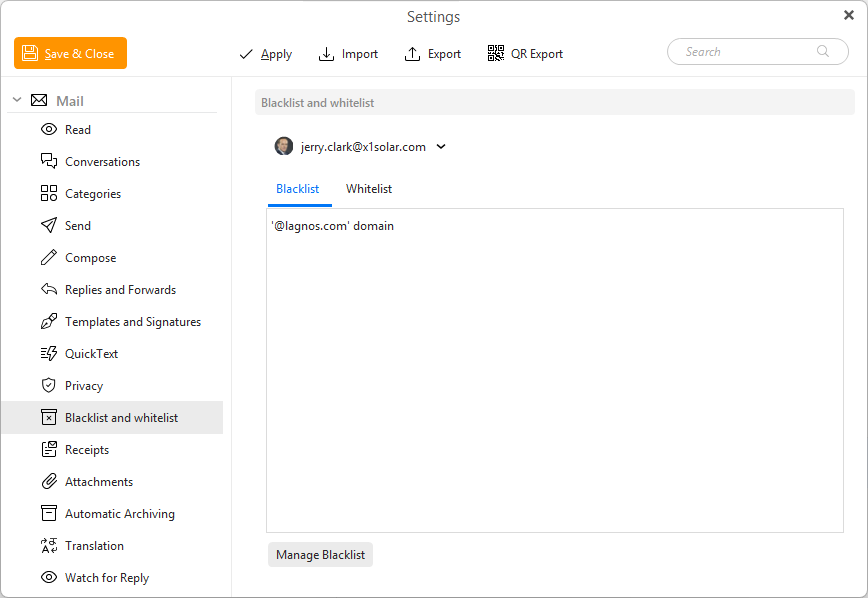
In the Blacklist and whitelist settings section you can add or remove items from each list using the Manage Blacklist and Manage Whitelist buttons.
This window will then open:
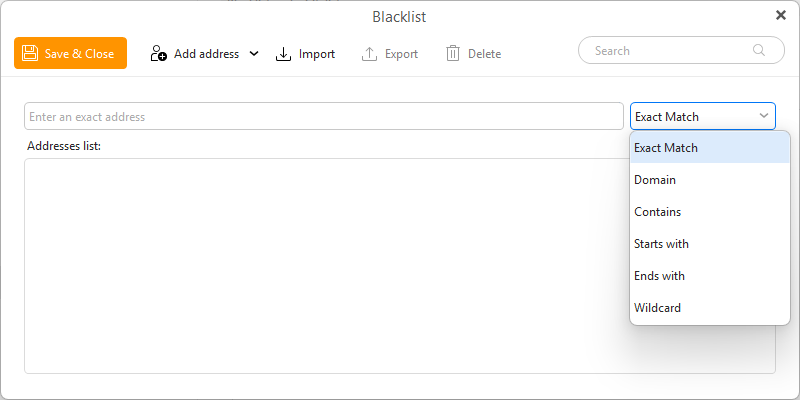
- Save & Close - use this button to save any changes made to the list and close the window
- Add address - use this to confirm the input of the text/email address/domain below. You can also use the drop-down option to add email from contacts
- Import - import a list of email addresses/domains/queries to populat the list. TXT files with eat item on new line is supported
- Export - export the list into a TXT file
- Delete - delete the selected item from the list
- Search field - use this field to search through the list
Under the toolbar you have the main text field which is used to type in what you want to add to the Blacklist.
You can add partial addresses or domains too, using the selector to the right:
- Exact match - insert the full email address, only messages from this exact email address
- Domain - match the full domain after the @ symbol
- Contains - the text can be inside any part of the email address, for example just part of the domain or name part of the address
- Starts with - the beginning of the email address
- Ends with - the ending of the email address
- Wildcard - you can insert a more complex query using the * wildcard (which can mean 0-x characters) or ? to mean 1 character
The options work the same for blacklists and whitelists.
Copyright ©
2025 eM Client s.r.o.
Thámova 18
Prague, 186 00
Czech Republic
[email protected]